
Money management is easier than ever with our digital tools
Secure, 24/7 account access
Check balances and pay bills
Review recent transactions
Deposit checks with a smartphone
Keeping you informed
A major benefit of Digital Banking is that we can send alerts notifying you of low balances, declined transactions, maturing CDs, and other significant account activity.
Enjoy first-rate services without visiting a branch
Financial technology can be a true time-saver. With GreenState Credit Union Digital Banking, you can log in to your accounts morning, noon, and night – whenever there's free time in your busy schedule. With Mobile Banking, you can manage money from anywhere with the help of our user-friendly app.
- Download the free GreenState app from Google Play or the App Store
- Get up-to-date account balances
- Transfer funds between accounts
- Deposit checks from anywhere with mobile check deposit
- Make bill and loan payments
- Review recent transactions
- Turn your debit or credit card "on" or "off," and set spending limits
- Locate GreenState branches and ATMs
- Easily view all your accounts on one web page
- Check account balances and transfer funds between accounts
- Make bill payments with free, Online Bill Payer
- Make current loan payments and schedule recurring payments
- Review your transaction history
- View check images, tax forms, and monthly e-Statements
- Deposit personal, business, and other kinds of checks using camera-equipped mobile devices
- Sign the back of your check as you normally would, adding the phrase, "For mobile deposit only"
- Using your mobile device camera, click images of the front and back of your check
- Follow the simple instructions in the app to send your check images and complete your deposit
- You will receive electronic confirmation from GreenState that your deposit has been accepted
- Funds are often available as soon as the next business day
A Guide for First-Time Users
- From any page on greenstate.org, click Log In and then New User Enrollment in the Online Banking login box.
- This opens the Online Banking new enrollment account verification screen. Enter all the required information and click Continue.
- A new browser window will open congratulating you for having successfully enrolled in Online Banking. Make note of your temporary password, you will need it to log in to complete the enrollment process. Follow the Click Here link to continue with the log in process.
- You will be directed to a page where you are to select the delivery method of your Secure Access Code (phone or text message).
- When you receive your Secure Access Code, enter it in the access code screen and click Submit. The secure access code is valid for only 15 minutes. If it expires, you must request a new one.
- Once your access code has been accepted, you will be asked if you would like to register your device. If you register your device, you will not have to generate a new secure access code when you use that device in the future.
- Now you can change your password. Use your temporary password as your old password. For your protection, you will need to create a password that meets the stated security requirements. Click Submit. When the pop-up window appears, click OK to confirm.
- A view-only online profile screen will appear for your review. It will be grayed out and you cannot make any changes at this point. However, please note any contact information that you would like to change in the future. Once you have accessed Online Banking, you will be able to use the Update Personal Information screen to make corrections. Click Submit then OK to continue.
- Review the welcome first time user screen, which presents the Online Banking Services Agreement. Read and acknowledge that you agree to the conditions by clicking, I Accept.
It’s Easy to Start Using GreenState Mobile
- Sign up for GreenState Online Banking to access mobile banking.
- Download the app from the Google Play or Apple App Store.
- Use the same login credentials to access mobile banking that you established for online banking.
Enjoy the same features as online banking as well as Mobile Remote Deposit Capture!
Mobile Banking App Tip: Use Touch ID
- You can set GreenState's mobile app for touch ID (thumb print) logins if your smartphone or tablet allows for this.
- Log in to the GreenState mobile app from your phone, then go to Menu > Settings > Security Preferences > Touch ID.
- The next time you log in, you will see Touch ID as an option.
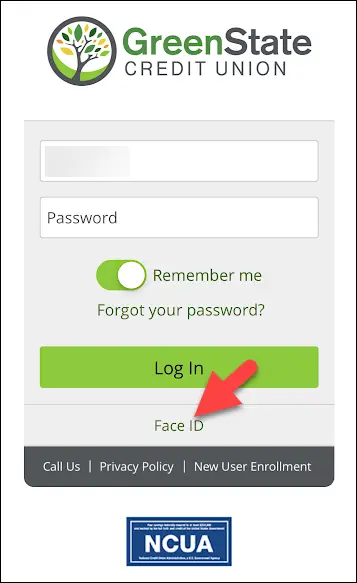
- Step by Step Guide to Enable Touch ID or Face ID logins on available devices.
How to setup Face/Touch ID
You can set GreenState's mobile banking app to allow for touch ID (thumb print) and Face ID (face scan) log in's if your smartphone or tablet allows for this.
1. Log in to the GreenState mobile app from your phone.
2. Tap on MENU.
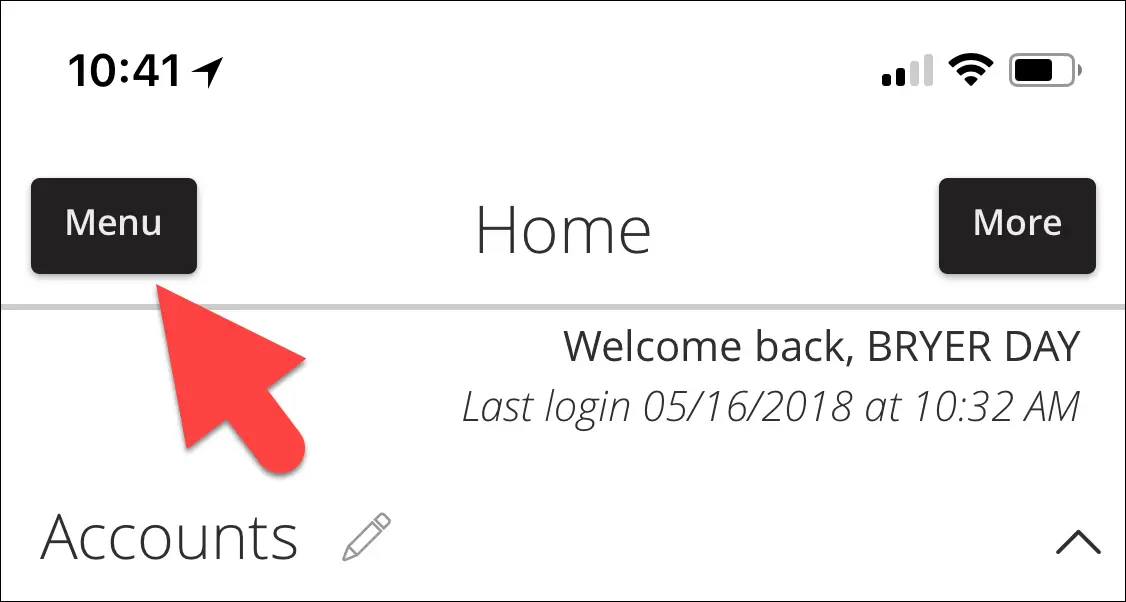
3. Tap SETTINGS.
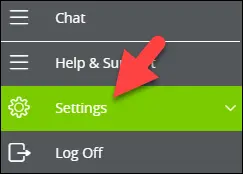
4. Then tap SECURITY PREFERENCES.
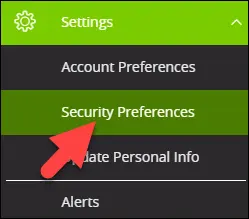
5. Next tap TOUCH ID.
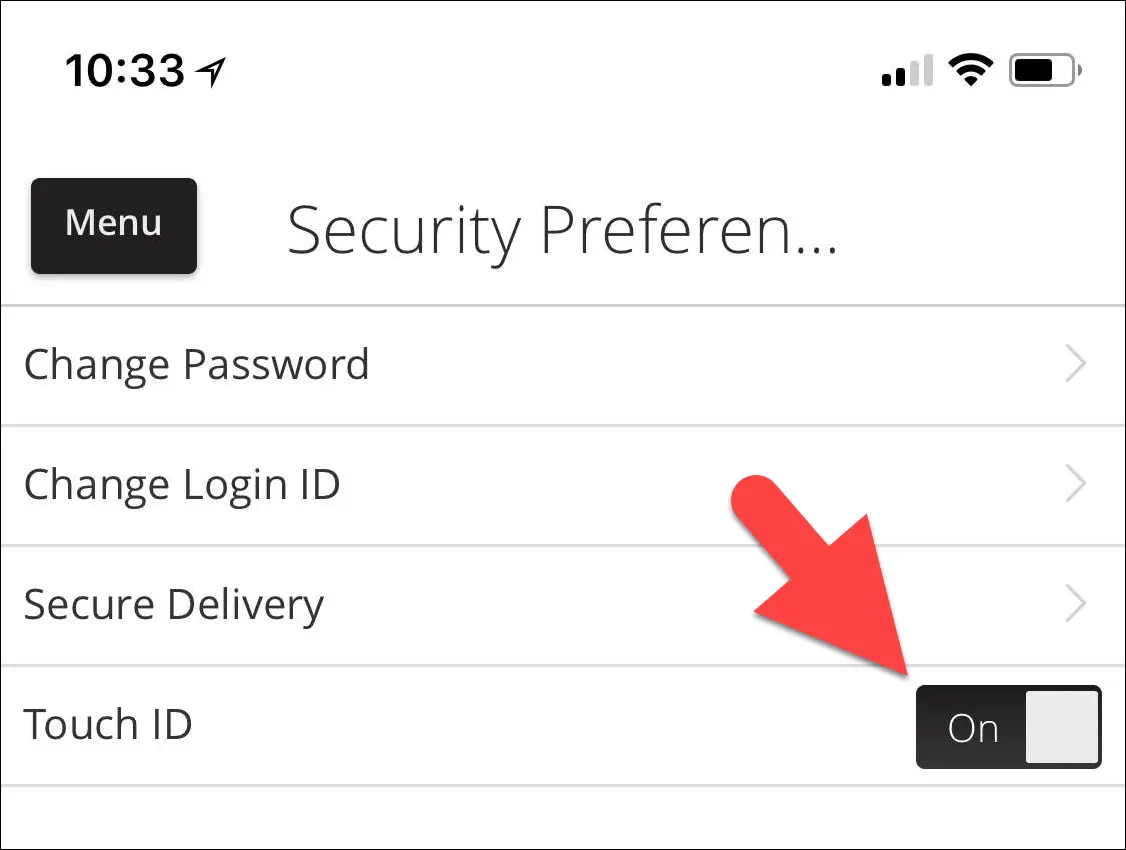
6. Next time you login, you will see TOUCH/FACE ID as an option.
Frequently Asked Questions
eStatements
eStatements are your regular account statements from GreenState Credit Union delivered electronically instead of by the U.S. Postal Service. It looks like your statement, reads like your statement, has all of the information found on your current statement, and if you want a hard copy, you can print it on your printer or save it on your computer.
To enroll in eStatements, you must first be enrolled in online banking. Then, follow these instructions to sign up for eStatements.
- Log on to online banking
- Select the Services option from the main menu, and select the eStatements sub option.
- Read the disclosure. As well as providing terms, this will tell the ‘new’ enrollee what and what not to expect on day one.
- Click ‘I Agree’ to accept the terms and to continue
There will be no statement history until the end of the current statement cycle. You will receive an email notification when your statement is ready to view. As each monthly statement is generated, you will begin to build a rolling 15-month history of statements.
No. You must wait until your first statement period ends. Then you will build a rolling 15 months worth of statements, notifications and tax documents.
Once you are set up for eStatements your mail statements will stop. Again, you can easily print a copy or save a copy to your computer.
eStatements is provided as a free service. There is a $3.50 fee per month for paper delivery of regular statements. There may also be a research or duplicate copy fee for copies of old statements.
You will be notified by email at the email address you provide during the enrollment process when your statement is ready for viewing. You can access your statement by logging in to online banking.
Your acknowledgment is our record of your agreement to receive statements electronically instead of by mail.
A valid email address is required for you to receive your statement notifications. Please update your new email address in online banking or by calling us.
Online banking will store up to 15 months worth. If you wish to keep them in electronic form for a longer period of time, you will need to save it to your computer. Only statements from your enrollment date forward are available.
Signing up is easy! Once you log on to online banking, click on eStatements and follow the prompts.
Mobile Banking
Yes, if your Apple device has Touch ID, our mobile app supports this. You will need to turn this on within your mobile device under security preferences.
Due to security risk, the new system does not allow you to save your password for online banking.
Mobile Deposit
MRDC is accessed using the mobile app (iOS or Android); MRDC is not available in the browser experience (Internet Explorer, Chrome, Firefox, Safari, etc.) MRDC can be found within the app (under Q: Menu > Transfer/Deposits > Deposit Check). MRDC deposits post to the user account in near real-time. All deposits are subject to a 2 business day hold on all amounts. Please be sure to endorse and write "FOR MOBILE DEPOSIT AT GREENSTATE CU" on the back of the check or it will not process.
MRDC deposits post to the user account in near real-time. There will be a 2 business day hold on all amounts. A maximum of 5 checks or $10,000 may be deposited per day.
There could be a few reasons your check was declined. The check is missing information such as the Routing Number, Account number or the endorsement "FOR MOBILE DEPOSIT AT GREENSTATE CU". The check is damaged or is illegible. The amount exceeds $10,000.00 or more than 5 checks per day. The amount exceeds $20,000 or more than 20 checks per month.
After you see the deposit has been accepted in the mobile app, write "void" on the check. Keep the deposited check for at least two business days or until you have confirmed the funds have been posted to your account, then you may shred the check.
Members that are signed up for online banking need only to download the GreenState online banking app to receive the service.
MRDC features multiple layers of security including password protection, Internet firewalls, and 128-bit encryption (256-bit encryption for mobile), the highest level of security available.
You don’t need to visit one of our branch offices or go to an ATM to make check deposits. You can deposit from anywhere, 24/7.
Members will not be charged a monthly fee to use MRDC. If you discontinue Remote Deposit services and decide to reinstate then you will be charged a one-time service fee.
Any of our personal checking or savings accounts.
Yes.
Yes, you can print them from your History screen in MRDC up to 60 days from the date of the transaction. Thereafter, you will need to request a copy just like any other deposited item.
Yes. After you are registered for MRDC, you can still make deposits in whatever method is most convenient for you.
"Android™ Requirements
- Android 5.0 and later
Apple iOS Requirements
- iOS 10.0 and later
Mobile Connectivity Requirements
- 5G, 4G LTE, Wi-Fi
Camera Requirements
- 5 megapixels or higher"
What our members are saying
"I love the GreenState app—it keeps me on top of my finances, lets me check my credit score, and offers great features. The staff is always kind, knowledgeable, and truly has my best interest in mind. "
Flexible all-in-one checking that earns dividend rewards and cash back.